June 22, 2026
I Built an SFTP Server That Never Touches Disk
How I designed and shipped a zero-storage SFTP gateway for CADRE that streams files directly to S3 in real-time, without using AWS Transfer Family.
Quick note before you start: This isn’t a dry corporate whitepaper or a complex engineering document. It’s just a brain dump of how I solved a classic file-sharing problem without AWS Transfer Family or making my life complicated. If you’re looking for enterprise-speak, you won’t find it here. Welcome!
I had to build an SFTP server last week.
Yes, SFTP. The file transfer protocol that was invented before most modern web developers were born.
This was a strict requirement from one of our enterprise clients. Because of their internal security policies and legacy infrastructure, they could only transfer files using SFTP. They couldn’t use a web form, they couldn’t write a custom REST API client, and they couldn’t authenticate with modern OAuth. They just wanted an SSH key, an IP address, and a remote directory to dump files into.
So, we needed to support SFTP. But how do we build it in a way that is simple, secure, and doesn’t break in the middle of the night?
Wait, What is SFTP and Why Do We Need It?
For anyone who hasn’t had to deal with this: SFTP stands for SSH File Transfer Protocol (or Secure File Transfer Protocol).
Think of it as FTP’s secure, modern sibling. FTP is like sending postcards, meaning anyone along the route can read the data. SFTP runs inside SSH, meaning the entire connection is encrypted. It’s like putting your files in a locked vault suitcase before shipping them.

At CADRE, our clients need to upload large documents (contracts, datasets, reports). They want to do it over SFTP because it’s already integrated into their systems.
Once those files are uploaded, we need them to land in AWS S3 so our background processes can analyze them.
The Staging Disk Way (and why it kind of sucks)
The classic way to build this is pretty straightforward:
- Spin up an EC2 instance.
- Attach a hard drive (EBS volume).
- Let clients upload files directly onto the disk.
- Run a script (like a cron job) every 10 minutes that copies files from the disk to AWS S3.
- Delete the file from the disk once it’s successfully uploaded to S3.
This works. It’s fine. But it has some annoying issues:
- EBS Storage Costs: You have to pay for a big disk just to act as a temporary holding area. If a client uploads a 10GB file, you need at least 10GB of EBS space, even if you delete the file 5 minutes later.
- The Sync Gap: There is a delay. Files aren’t available in S3 instantly. They have to wait for the sync script to run.
- Risk of Data Loss/Failure: What if the EC2 instance crashes mid-upload? What if the disk fills up because a client uploaded way more than expected? You get corrupt files, failed transfers, and a page at 3 AM.
I wanted something stateless. A server that is just a gateway.

The Idea: Streaming Directly to S3 (No Disk Writes)
Here’s the trick: SFTP is just a filesystem protocol.
When an SFTP client uploads a file, it sends commands like:
- “Open file
report.pdffor writing.” - “Here are some bytes.”
- “Here are some more bytes.”
- “Close the file.”
Normally, the SFTP server writes those bytes to its local hard drive. But what if, instead of writing them to disk, we redirect them straight to AWS S3 in real-time?
That’s what I built. A Python SFTP server that takes incoming file bytes, caches them in a tiny 5MB buffer in RAM, and streams them straight to S3. The EC2 instance has zero persistent storage. It never writes a single byte of the uploaded file to disk.
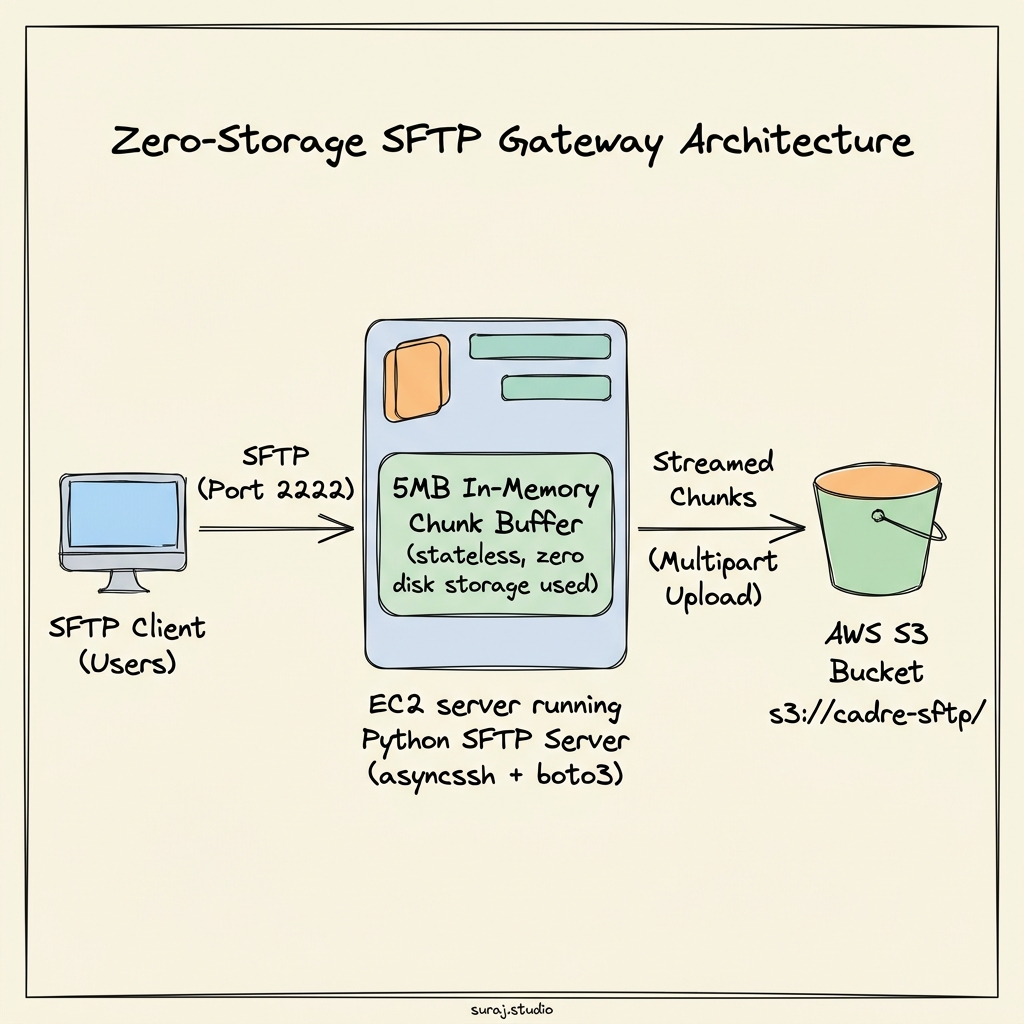
The Multipart Upload Trick
How do we actually stream to S3? S3 doesn’t let you just append random bytes to a file. You either upload the whole file at once (using PutObject), or you use Multipart Uploads.
Multipart upload is like cutting a giant sandwich into small, bite-sized pieces. You tell S3: “Hey, I’m starting an upload.” S3 gives you an Upload ID. Then, you ship 5MB pieces (parts) one by one. When you’re done, you say: “Okay, assemble the sandwich!”
Here’s a simplified version of the Python class I wrote to handle this:
class S3MultipartUploader:
    PART_SIZE = 5 * 1024 * 1024  # 5 MB (S3's minimum part size)

    async def write(self, data: bytes, loop):
        if self._upload_id is None:
            # Tell S3 we are starting
            await loop.run_in_executor(self._executor, self._start_upload)

        self._buffer.extend(data)

        # Once we have 5MB in memory, flush it to S3
        if len(self._buffer) >= self.PART_SIZE:
            chunk = bytes(self._buffer)
            self._buffer = bytearray()
            await loop.run_in_executor(self._executor, self._upload_part, chunk)

    async def complete(self, loop):
        # Small files (< 5MB) don't need multipart, just PutObject
        if self._upload_id is None:
            await loop.run_in_executor(
                self._executor,
                lambda: self.s3.put_object(Bucket=self.bucket, Key=self.key, Body=bytes(self._buffer))
            )
            return

        # Flush whatever is left in the buffer
        if self._buffer:
            await loop.run_in_executor(self._executor, self._upload_part, bytes(self._buffer))

        # Tell S3 we're done assembling the file
        await loop.run_in_executor(
            self._executor,
            lambda: self.s3.complete_multipart_upload(...)
        )
There’s one important constraint: S3 requires each multipart chunk to be at least 5MB (except for the last chunk). If we try to upload a 2MB chunk as part 1, S3 will throw an error. So for files smaller than 5MB, we wait until the client closes the file, and then we upload it in one single go using put_object.
The “S3 is not a filesystem” Headache
Streaming the file is the easy part. The real headache is making SFTP’s folder operations work against S3.
S3 doesn’t actually have folders. It’s just a giant flat list of files with keys like alice/uploads/report.pdf. The slash / is just a character. But SFTP clients expect actual folders. They want to run commands like mkdir (make directory), rmdir (remove directory), and stat (get file details).
If an SFTP client runs mkdir uploads, S3 doesn’t have anything to create.
If they do listdir, we have to query S3, look for prefixes, and pretend folders exist.
To solve this, I kept a virtual directory set in the server’s RAM.
When a client runs mkdir, we don’t call S3. We just add the folder name to a Python set in memory. When the client runs stat to check if a folder exists, we first check our Python set. If it’s in there, we say: “Yep! That’s a directory.”
async def stat(self, path):
    # ...
    stripped_path = normalized.strip("/")
    if stripped_path == "" or stripped_path in self._virtual_dirs:
        return asyncssh.SFTPAttrs(permissions=0o40755, size=0)  # Pretend it's a directory

    try:
        # Check if it's a real file in S3
        resp = await self._loop.run_in_executor(
            None, lambda: self.s3.head_object(Bucket=S3_BUCKET, Key=s3_key)
        )
        return asyncssh.SFTPAttrs(permissions=0o100644, size=resp["ContentLength"])
    except Exception:
        # Check S3 prefix (directory with files already uploaded)
        prefix = s3_key.rstrip("/") + "/"
        list_resp = self.s3.list_objects_v2(Bucket=S3_BUCKET, Prefix=prefix, MaxKeys=1)
        if "Contents" in list_resp:
            return asyncssh.SFTPAttrs(permissions=0o40755, size=0)
        raise asyncssh.SFTPNoSuchFile("No such file or directory")
This keeps the server extremely simple, though it has one trade-off: if the server restarts, any empty virtual folders created by the client disappear from memory. But since clients usually create a folder and upload files to it immediately in the same session, this works perfectly in practice.
Keeping Operations Simple
I wanted the operations to be as boring and simple as possible. No Kubernetes, no Docker, no Ansible.
I wrote two simple scripts:
deploy.sh: Runs from my laptop. It copies the Python files to the EC2 instance, installs dependencies, sets up a systemd service, and starts it. If I need to upgrade the server, I just run./deploy.sh.manage_users.py: A CLI tool to add/remove users. It loads keys from a simpleusers.jsonfile.
No database required!python3 manage_users.py add alice "ssh-ed25519 AAAAC3... alice@example.com"
What I Learned From This Rabbit Hole
- S3’s API is quirky but powerful. Once you get past the 5MB multipart minimum size constraint, the API is super reliable.
- Simplicity is a feature. The entire codebase is about 450 lines of Python. If something breaks, I don’t have to look through multiple services or database records. I just open one file and read the logs.
The Result
We’re running this on a lightweight EC2 instance. Files are available in S3 the exact millisecond the upload is complete. No disks to clean up, no lag, and no staging storage to manage.
For an engineering solution, “boring and cheap” is the ultimate compliment.